Design and Build Quality
The DJI Mini 4 Pro has gotten a lot of attention with all the opinions flying around online. As someone who’s flown dozens of consumer drones over the years, I learned everything there is to know about this little machine. Today, I will share it all with you.
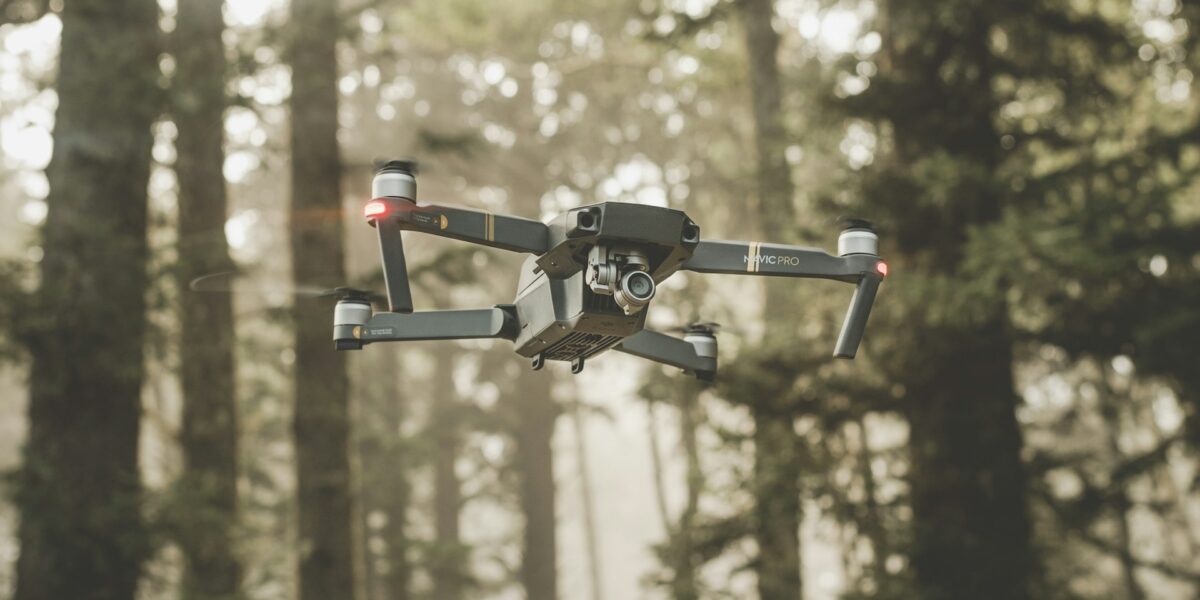
First off, let’s talk about how this thing looks and feels. DJI nailed the compact design here. It fits in a small backpack — honestly, it fits in a large jacket pocket if you’re creative about it. The build quality surprised me, considering the size. That durable plastic body has a premium feel, and the gray finish looks sharp without screaming “look at me.” And here’s the kicker: the whole thing weighs under 250 grams. If you know anything about drone regulations, you know that’s a magic number. Staying under that weight means you dodge a bunch of registration headaches in most places.

The arms and props fold up clean and tight. I’ve tossed this thing in my bag more times than I can count without worrying about snapping anything off. It’s got the standard four-rotor setup you’d expect, and the indicator lights are positioned where you can actually see them mid-flight, which sounds like a small thing until you’ve flown a drone where you can’t tell which end is which at 200 feet.
Camera Features and Performance
Probably should have led with this section, honestly. The camera is the real star here. It’s packing a 1/1.3-inch sensor that shoots 48MP stills. That sensor size is a legitimate upgrade from older Mini models — low-light shots look noticeably better, less grainy, more usable. Video tops out at 4K/60fps, which is more than enough for most people’s needs.
HDR support is baked in too, and it actually makes a difference when you’re shooting into sunsets or dealing with patchy cloud cover. The gimbal stabilization does its job well. I’ve flown this in 15+ mph winds and the footage still came out smooth. You get your usual shooting modes — slow motion, time-lapse, panorama — plus QuickShots for those automated cinematic moves. SmartPhoto is nice for when you don’t want to fiddle with settings; it reads the scene and adjusts on its own.
Flight Performance
Battery life clocks in around 34 minutes on a full charge. That’s solid for a drone this size. Not groundbreaking, but you won’t feel rushed either. The way it hovers is rock steady — I’ve left it hanging in place while adjusting camera settings and it barely drifts. Controller response is snappy. No noticeable delay between stick input and movement.
Sport mode pushes it up to about 57 km/h, which is genuinely fun once you’re comfortable with the controls. Don’t do that on day one, though.
That’s what makes the Mini 4 Pro endearing to us drone pilots — it packs obstacle sensors on three sides (forward, backward, and downward) into this tiny frame. Collision avoidance actually works well in practice. I’ve watched it route around tree branches I didn’t even notice. Beginners will appreciate the safety net. Experienced flyers will appreciate not having to replace propellers every other week.
Controller and Connectivity
The remote feels good in your hands. Ergonomically, it’s comfortable even on longer flights. Here’s what I really like: there’s a built-in display showing flight telemetry. No phone required. That was always a mild annoyance with older models — fumbling to mount your phone, making sure it didn’t overheat in the sun. Now you just grab the controller and go.
Connectivity runs on DJI’s OcuSync 3.0, which gives you solid range up to about 12 kilometers. In real-world use, I’ve had clean video feeds well past what I’d normally fly. The live view stays sharp and reliable, and I haven’t experienced dropout issues even in areas with moderate radio interference.
Intelligent Flight Features
DJI loaded this thing up with smart features. ActiveTrack 4.0 follows subjects well — I’ve used it to track mountain bikers and joggers, and it kept them framed without me touching the sticks. Point of Interest is great for orbiting around buildings, landmarks, whatever catches your eye. It produces those smooth, cinematic orbits that look way harder than they actually are.
Waypoints let you plot a flight path ahead of time, which frees you up to concentrate on getting the shot right instead of worrying about where the drone’s going. The return-to-home function has been tightened up too. It lands within inches of where it took off. I’ve tested it from a few hundred meters out and it nails the landing spot every time.
Software and Application Support
You’ll be living in the DJI Fly app, and fortunately it’s well put together. The interface is clean enough for newcomers but doesn’t hide advanced settings behind too many menus. There are built-in tutorials that are genuinely useful if you’re learning specific moves or flight patterns. You can also do basic edits on your footage right in the app and share it straight to social media, which is convenient when you’ve grabbed something cool and want to post it fast.
Firmware updates push through the app automatically. DJI also keeps the no-fly zone database current, so your drone stays compliant with airspace rules without you having to think about it much. That’s one less thing to worry about.
Battery and Charging
The lithium-polymer battery is purpose-built for this drone, and it charges via USB-C. At this point everything charges through USB-C, so you probably already have cables lying around everywhere. The battery management system is smart about power distribution and helps extend the overall lifespan of each cell.
My honest recommendation? Buy at least two extra batteries. Thirty-four minutes sounds like a lot until you’re out at a beautiful location and your first battery dies mid-shot. A multi-charger accessory is available so you can juice up all your batteries at once overnight.
Portability and Accessories
Portability is where this drone really shines. If you travel at all, this is the drone to bring. The carrying case is small but protective. I’ve also grabbed a set of propeller guards, which I’d recommend if you’re flying indoors or in tight spaces — they’ve saved me from a few wall encounters.
ND filters are compatible and worth picking up if you shoot a lot of video in bright daylight. They cut the light reaching the sensor, letting you use slower shutter speeds for more cinematic motion blur. The controller can also hold different devices if you prefer monitoring on a tablet or larger phone screen.
Pricing and Availability
Price-wise, the Mini 4 Pro sits at a sweet spot. It’s not cheap, but it’s fair for what you get. You can grab the drone by itself or go for the Fly More Combo, which bundles in extra batteries and accessories — and honestly, the combo is where the value is. It’s widely available through DJI’s website, Amazon, Best Buy, and a bunch of other retailers. Shouldn’t have any trouble finding one in stock.
Recommended Aviation Gear
David Clark H10-13.4 Aviation Headset – $376.95
The industry standard for aviation headsets.
Pilots Handbook of Aeronautical Knowledge – $25.42
Essential FAA handbook for every pilot.
As an Amazon Associate, we earn from qualifying purchases.